Multi-frequency modified QRPKits.com Easy Transmitter

This weekend I returned to a shelved project from several months ago, a complete 40 M QRP station built around the Easy Transmitter & Easy Receiver kit line from Pacific Antenna (QRPKits.com).

Why the Basic Pacific Antenna Kits?

I first became aware of these excellent basic kits a few years ago when we chose the Easy Receiver kit as a group build project for a Wednesday Workshop at the Yale Center for Engineering Innovation and Design that we, W1YU, the Amateur Radio Club at Yale University were hosting.

The CEID is a nicely equipped maker space at Yale and their Wednesday Workshop series allows students, faculty and staff to learn something new by making. Popular Wednesday Workshops have included chocolate making, woodworking, 3D printing and W1YU would program a workshop to introduce the uninitiated into radio fundamentals.

We chose the QRPKits.com 40-meter direct conversion receiver for one of our workshops because the kit was simple to build and able to be completed in less than two hours, was inexpensive, and had a reputation of working the first time. That night 20 CEID members, most of whom never soldered before, paired off into 10 teams and after a presentation on RF and a brief soldering tutorial, they got down to work. I’m very pleased to say that out of 10 kits attempted, all 10 worked, with only a couple needing nothing more than a touch up of a cold solder joint or two.

My Current Project

My initial plan was to build the Easy Receiver and Transmitter and mount them into a single enclosure (a cigar box) to make an all-in-one station. In addition to the receiver and transmitter, I had also planned to incorporate the Easy Audio Bandpass Filter, the Easy TR switch, and the Easy Low Pass Filter to limit out-of-band harmonics on transmit.

I had assembled all of the basic kits several months ago and as I often do, became sidetracked and never finished the project. I came across my circuit boards recently in my basement workshop and decided to pick up from where I left off.

I had previously completed the receiver, audio filter, TR switch and the low pass filter. The transmitter was still in its original packing, so this became my first project for the new year.

My completed 40M transmitter with rotary crystal selector and fine tune control.
The completed project delivers 2.0 watts on all five frequencies.

A Couple of Modifications

I mentioned I came across the unfinished project in my basement recently. Over the past several months I have been working on organizing my workspace including inventorying and sorting the myriads of components I’ve managed to stockpile over the years. One of the things discovered in doing so was a variety packet of 40 and 80-meter HC-18U crystals for the QRP experimenter.

I decided I wanted to modify my transmitter build so instead of just being limited to the 7.040 crystal that came with the kit, I could easily select a different frequency by swapping crystals. The kit itself makes a provision as it includes a socket so the builder/operator could plug in a different crystal if they wanted to change frequencies.

My modification takes the concept a step further. Creating a small bus board on which I mounted several crystals and connecting one end to a rotary switch, I was able to make changing frequency as easy as twisting a dial. My transmitter allows the operator to quickly choose between 7.030, 7.040, 7.055, 7.110 or 7.118 MHz.

I made two other minor modifications. I incorporated the low-pass filter on board in the transmitter cabinet instead of as a stand-alone accessory, and I also added a yellow LED coupled with a 1K resistor to provide a power on pilot light on the front panel.

The green PCB is my multi-crystal mod. One side of the crystals are tied together and connected to the crystal socket on the main board while a ribbon cable connects the other sides to the rotary switch below.

I used a small Nub cigar box for my cabinet. I sanded off some printing on the bottom surface and applied a nice cherry stain to the box. Orienting the box so I used the thin bottom as the front of the radio, I had no problem with short potentiometer shafts. The sides of the box were quite a bit thicker, however, and I needed to countersink the holes drilled for the SO239 antenna connector and the coaxial DC power socket.

Another nice feature of the Nub box is that it has a slide off lid, which now becomes the back panel of the radio. It makes for easy opening for repairs or adjustments – or for show and tell at the local club.

How does it work?

The Easy Transmitter Kit promises 2 to 2.5 watts output on the 40-meter band, and I am very pleased to report that indeed, I measured a solid 2.0 watts on all five frequencies. The circuit includes a 5K potentiometer for fine tuning which allows a band spread of a few kHz. For the four lowest frequencies, I spotted my signal right on frequency with the fine tune knob set dead center. 7.118 was a bit off center, unlike the others, but still solidly within range of the fine tune control.

Needless to say, I was very impressed with the initial performance of the transmitter the first time I powered it up.

What’s Next?

I mentioned that I have already purchased and assembled the other kits in the QRPKits.com “Easy” line. I plan on mounting the 40 meter Easy Receiver and the Easy Bandpass Filter in two separate but matching Nub cigar boxes. I plan to mount a speaker in bandpass filter cabinet and include a headphone jack, and to not include any speaker on the receiver. I plan to either use the receiver with earphones (my preferred means for operating CW) or will use a 3.5mm jumper to feed the bandpass filter/speaker unit.

I am contemplating building a small linear amplifier to give myself a boost as needed. QRPKits.com and QRP-Labs.com each offer a simple RF amplifier at a low price that promise to boost 2 watts into the 7-10 watts out range.

I highly recommend the QRPKits.com Easy series of kits for the aspiring kit builder or the old timer, like me. As priced, they remain a great value, and the kits are easy to assemble and best of all – have always worked as advertised.

I plan to blog about the matching receiver and audio amp/bandpass filter as I manage to complete those projects. Have you built any of the QRPKits.com kits? What was your experience? Drop me a line and let me know how you fared at james@ab1dq.com.

Thanks for stopping by my blog & 73!
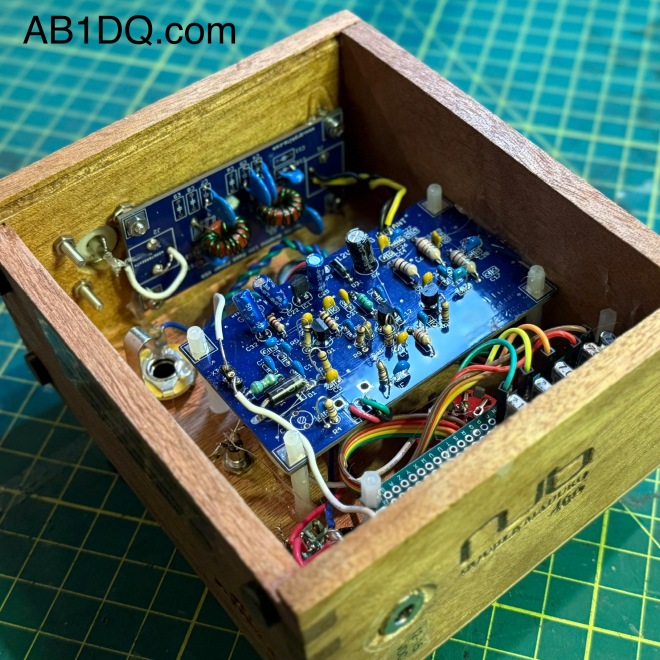
A peak inside – the auxiliary low pass filter was mounted to the side just above the S0239 connector, using a mounting screw from the S0239 and a modest amount of hot glue to hold the board in place.

©2025 JMSurprenant & ab1dq.com.
Bayou Jumper in a Cigar Box

I was thrilled to see that the good folks at the Four State QRP Group released the 4th revision of their popular Bayou Jumper 40M CW Transceiver designed by Jim Giammanco N51B and David Cripe NM0S last year.

The Bayou Jumper, first released in 2017, is a 40M QRP transceiver that is an homage to the classic Paraset, the legendary transmitter/receiver supplied to the resistance groups in France, Belgium and the Netherlands during World War II.

Whaddon Mk VII – Paraset Clandestine Transceiver c. 1942

The Bayou Jumper, an updated solid state CW only radio kit is intended to be fitted into a hinged wooden suitcase style box available from Hobby Lobby or any other similarly sized box.

Given my recent obsession with building QRP radios and accessories into empty cigar boxes, I felt the Bayou Jumper would make an excellent candidate for cigar box treatment. I found a gorgeous Perdomo 20th Anniversary cigar box in my stash that was approximately the right size, featured gorgeous red and gold artwork on a black background and was constructed of heavier wood than many of the other cigar boxes in my collection.

The Bayou Jumper front panel was a perfect flush fit left to right in the Perdomo box, and only fell 1/2″ short front to back. I modified the box by gluing a 1/2″ square dowel along the top hinged edge to fill the empty space.

Other mods I made to the cigar box included:

  • Adding weights to the bottom of the box to prevent the radio from tipping over backward when the lid was up and to provide a little more heft,
    • Adding a pair of latches to be able to secure the lid closed, and,
      • Reinforcing the original pressed in hinges with three supplemental screw-in hinges.

Building the Kit

I chose the Bayou Jumper to be my 2022 Christmas project. Professionally I have worked in an administrative role in higher ed for the past two decades and one of the biggest perks of working at most leading universities is they completely shut down for an extended winter recess. Building an electronic kit during my winter recess takes me back to my teenage years when I’d spend my holiday break from school constructing the electronic kits I received as Christmas gifts.

Like every NM05 designed 4SQRP kit I have previously built (the Murania One Transistors Boy’s Radio, the 4S-QRP Antenna Tuner, and the Ozark Patrol Regen Shortwave Receiver), assembly was a relaxing no-stress experience. Once again, I was very pleased with the high quality of the double sided etched-through printed circuit board, the quality of the electronic components and hardware, and the in-depth and easy-to-understand instructions and documentation.

I encountered only two minor issues in building the Bayou Jumper Revision D that were hardly a problem, barely an inconvenience.

The first was a missing resistor, R15, a 1/4 watt 100K ohm resistor. I have never experienced a missing part when building a 4SQRP kit and it’s probably just as likely I dropped or lost the resistor than it was wasn’t shipped in the kit. Regardless, I had the correct value resistor on hand in my home stock supply.

The second matter involved the jumper wires provided to supply current to the multi-color LED on the front panel from the main PCB. The instructions stated the kit included a 12″ jumper wire with header pins included in the kit that needed to be cut in half to make two jumpers. However, the jumper wire included in my kit was only 5.5″ long and once cut it in half as the instructions directed, one of the resulting leads was too short to mate to the header pin on the PCB.

As with the missing resistor, I had plenty of jumper wires that I use for breadboard prototyping on hand and was able to create the necessary jumper wires with sufficient slack to reach the contact points.

All in all, the kit went together in just 3 days’ time as I prefer to work slowly and methodically whenever I build a kit. (Whenever I rush through a project I typically find that any time I saved working quickly would be lost in extensive time consuming trouble-shooting that would be needed!)

The topside of my populated PCB. Assembling the kit was straightforward and fun.

Winding the Transformer

The Bayou Jumper features three inductors etched into the PCB but still requires the winding of a single transformer on a T 6-7 toroid core. I have never found winding coils to be difficult or stressful, and in fact, I generally enjoy it especially when the kitter provides excellent directions and illustrations, which 4SQRP did.

The transformer required 3 windings, one of 19 turns, one of 4, and the last of 2. The completed transformer can be soldered to either the top or bottom side of the PCB, based on the builder’s preference and tje screen printing on the circuit board makes installing the completed transformer essentially foolproof. I chose to mount the transformer to the bottom side of the board to make it easily accessible for adjusting the spacing of the winding to adjust the receiver’s tuning range.

The completed transformer mounted to the bottom side of the PCB.

Faux Crystals?

The Bayou Jumper’s crystal socket accepts the classic FT-243 crystal form, a popular Cold War era crystal size that today is no longer manufactured and increasingly rare.

The Bayou Jumper comes supplied with a pair of HC-49 crystals for 7.030 and 7.122 MHz, and two crystal adapter boards to fit the HC-49 crystals into the FT-243 sockets.

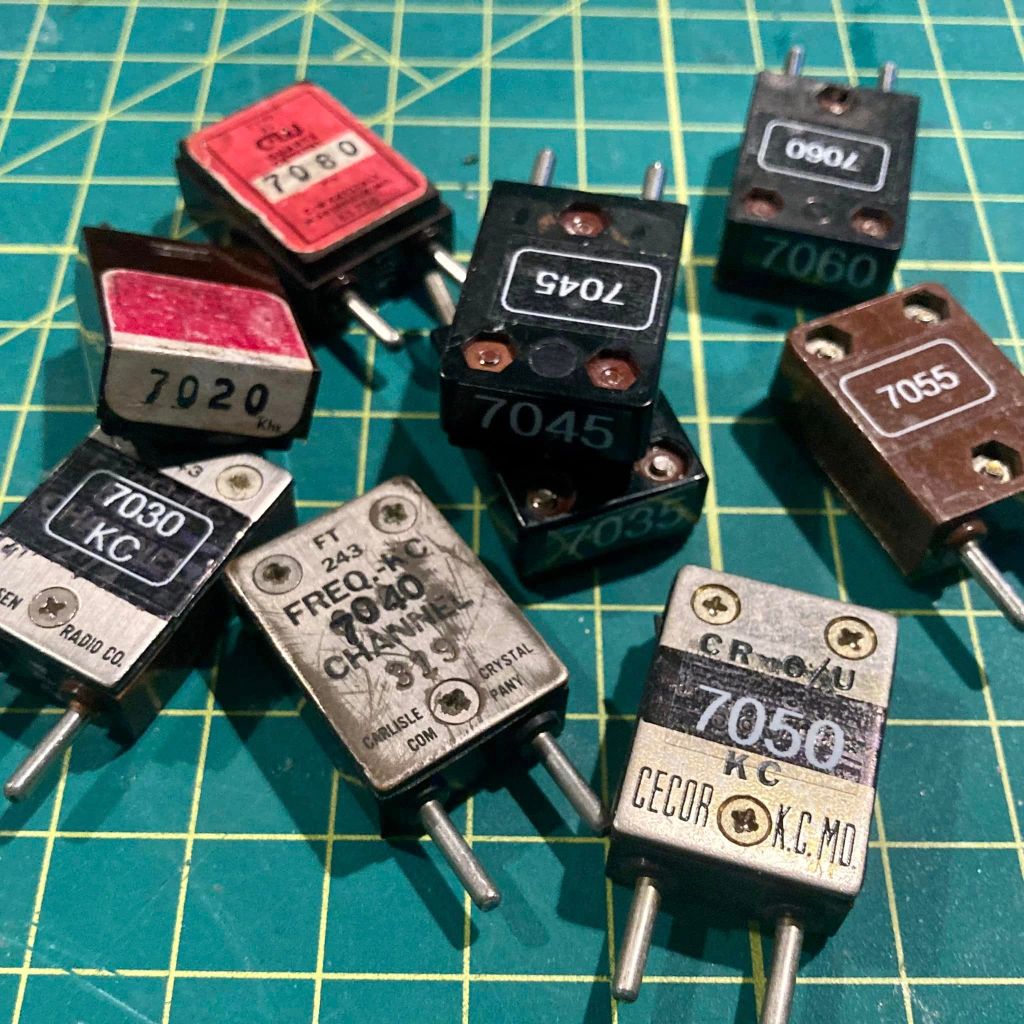
Vintage FT-243 cases are large enough to accommodate modern small HC-49 crystals and with its 3 screws, the FT-243 can be easily opened and re-sealed, making it possible to re-stuff FT-243 cases for modern QRP use.

Using several of the FT-243 crystals for non-amateur frequencies that I picked up at ham-fests, I have modified 9 crystals for use on the 40 meter CW sub band, all ready to go in my Bayou Jumper.

Receiver Alignment and Final Assembly

Again, the excellent directions made aligning the receiver a snap. Instructions are provided for a variety of alignment methods using an oscilloscope, a frequency generator or a calibrated receiver capable of CW reception. Having all three available to me, I tried all three methods and was pleased when all three were in sync.

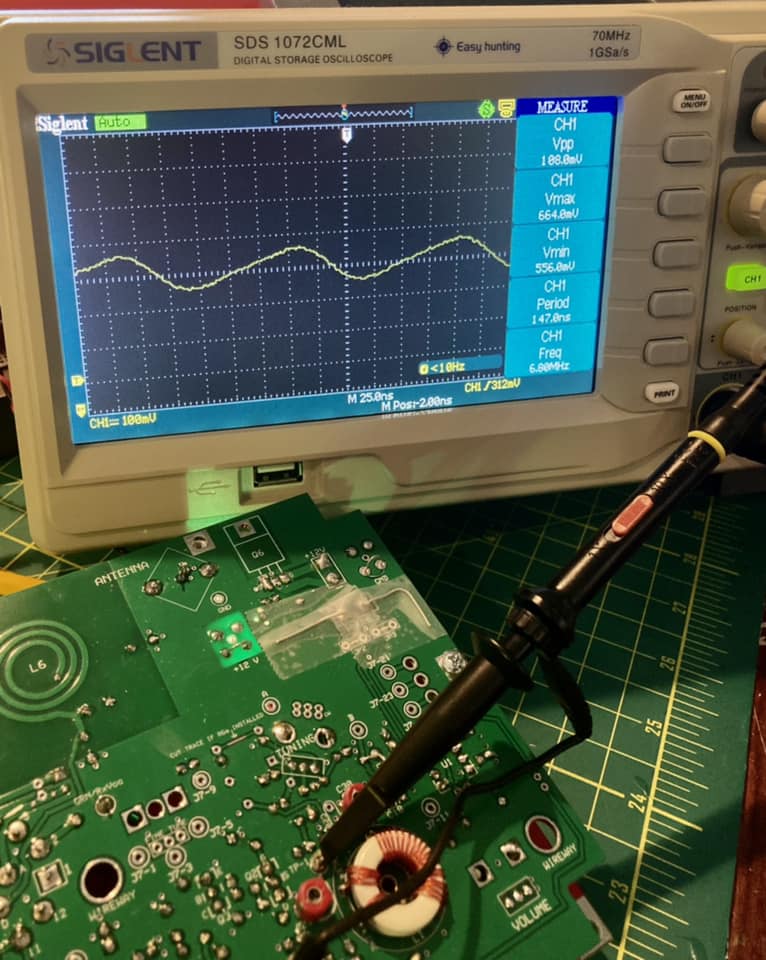
I started taking a frequency reading with the tuning dial set to the low end of the scale with my O-scope and read 6.897 MHz.

Next I tried sweeping the dial of my frequency counter to spot the point where oscillation could be heard in the earphones. My frequency counter has an analogue scale and was able to read the resonant frequency at about 6.9 MHz.

Finally I set my portable C. Crane Skywave SSB travel radio for LSB and tuned to the 6.900 and tuning up and down was able to hear the receiver’s oscillator at about 6.895 MHz.

Following the directions to adjust the tuning range by spacing the L1 windings on the transformer closer together or further apart and then adjusting the C30 trimmer, I was able to achieve a final tuning range of 7.000 – 7.167 MHz which should be more than adequate for the CW sub-band I would use.

Finally, I followed the directions to verify regeneration and was happy to find that my receiver needed no further adjustment. Satisfied with my work, I mounted the radio in the cigar box and am looking forward to putting my Bayou Jumper on the air.


Stay tuned for Part II where I will report on my experience operating the Bayou Jumper on the air and any future adjustments or modifications.

Elecraft K2 Build – Part 2

Front Panel Assembly

March 20, 2022

This morning I completed the Front Panel Board, the second board of the Elecraft K2 HF Transceiver Kit build that I began at the start of the year. After completing the Control Board on January 17, I took a complete month off working on other weekend projects before starting the Front Panel on February 21. I did state from the get go that I was going to take my time with this, my most ambitious kit build, and I’m staying true to my word.

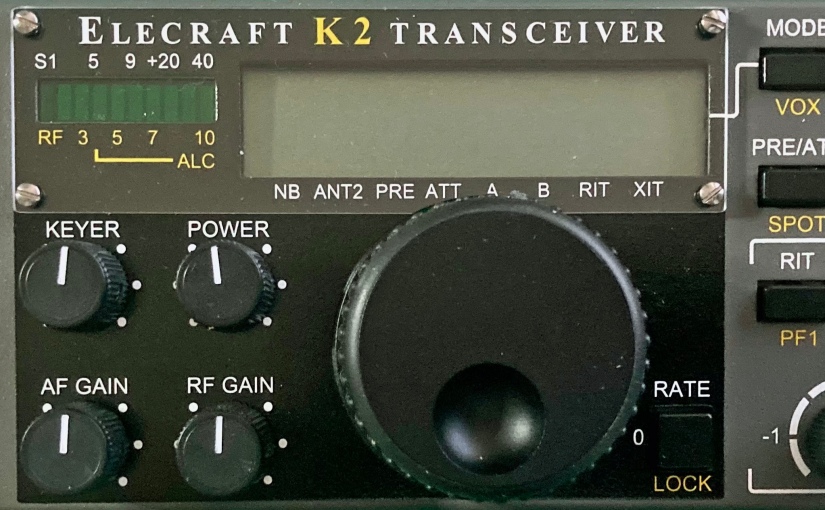
The Front Panel Board is where all of the user controls are mounted. These include the large rotary encoder/tuning knob, the numeric keypad and pushbuttons, and five variable resistors. This section also includes the graphical LED status bar display and the LCD main display.

Assembly of the front panel starts by soldering the sixteen tactile push button switches to the printed circuit board. For a proper and neat professional appearance, it’s essential that all of the switches be mounted at a precise uniform distance from the surface of the board.

Elecraft provides a nifty switch spacing tool in the kit which is essentially a thin narrow bit of PCB material that is placed under each switch which is then pushed flush to the spacing tool. This clever method worked exceptionally well for me.

After the switches are mounted, the board is populated with the usual components – resistors, capacitors, diodes and transistors. The front panel board has four ICs including the large 40 pin U1 which is mounted on the bottom side of the board and behind the display.

The front panel board also has a good bit of hardware to be attached including the eight-pin microphone jack and several spacers. Up to this point the instruction manual has been absolutely excellent in providing detailed easy to follow accurate directions.

However, I did encounter some difficulty when it came to mounting the main display components which consists of two backlight LEDs, their spacers, a white cardboard reflector, a frosted plastic diffuser, and the 40 pin LCD.

As I discussed in my previous post, the Elecraft K2 is a fabulous kit, but it’s a rather old kit, first prototyped a quarter century ago – in 1997! Understandably in the time since its introduction, some components become ‘unobtainium’ as the years go by. Vendors come and go and with advancing technology, manufacturers discontinue production of now archaic through-hole components with today’s increasing popularity of SMD architecture.

Thus, when one buys a K2 kit today, it will come with several pages of errata that must be carefully consulted and reviewed. Builders in 2022 will find themselves crossing out sections, sometimes whole pages, of the original manual, and adding notes about the replacement modern components packaged with their kit.

This was the case with the display assembly. I was instructed to cross out most of the directions pertaining to the installation of the display on pages 27 and 28 of the manual and to follow the alternative directions provided as errata.

The revised directions call for the builder to first insert the leads of a pair of rectangular LEDs through plastic spacers and solder the LEDs flush to the board to the left and the right side of where the LCD will be mounted.

Between the two LEDs, the builder places a white cardboard backlight reflector and then mounts a frosted plastic diffuser by placing it over the the two LEDs on the left and the right side. The diffuser has an indent on each side to accomondate the LEDs.

I found this all went precisely as described until I came to the step that instructed me to place the LCD flush on top of the diffuser and then solder the 20 pins of the LCD to the associated pads on the PCB.

None of the LCD pins were long enough to go through the holes in the pads on the board. If pressed flush to the diffuser the LCD pins just barely touched the pads.

With the LCD flush against the frosted crystal diffuser, the pins are too short to penetrate the holes in the pads.
A view of the bottom side of the board showing the inadequate length of the LCD pins.

I carefully checked the instructions and my work. I was certain I mounted the LEDs correctly and flush to the board with their spacers, and the cut outs on the bottom side of the plastic diffuser neatly accommodated the LEDs perfectly.

Realizing that proper positioning of the LCD would be critical for the PCB to properly fit in the front panel and knowing that not getting the spacing correct would also give the finished radio a sloppy appearance, I reached out to Elecraft for help via their website.

I dreaded the prospect of having to de-solder 20 pins and run the risk of damaging the LCD if I needed to remove it after it was soldered in place. I wanted to get as much information as I could before proceeding.

I received an email reply from Dave at Elecraft who is their K2 support guy within a couple of days. Dave stated that it was ‘perfectly normal’ for the LCD pins to just touch the top pads on the PCB and that they do not need to protrude through the holes. He said that his last K2 build was like this and suggested that I carefully solder the 20 pins from the topside, but to make sure the LCD is level and parallel to the board.

I did as Dave recommended, carefully aligning the LCD so it was level and evenly spaced above the board. I started by soldering each of the corner pins and confirming the LCDs position after each solder joint. Once done, I applied solder to the pads on the bottom of the board to let it flow through the hole to help ensure solid contact.

However, after I soldered just under half of the LCD pins, I realized I had left out the cardboard reflector. D’oh! There was no way I could slide the stiff cardboard under the pins at this point and I didn’t want to have to de-solder so many pins, so I came up with a workaround.

I took a piece of white copier paper and cut a rectangle to the same size as the cardboard reflector. Cutting the paper in half, I was able to slip both halves between the gap in the pins on the bottom of the LCD and position them in proper place. I held them in place with a bit of cellophane tape.

From here on out the rest of the front panel assembly went smoothly. Again I encountered the need to reference the errata for the main encoder knob as Elecraft includes a different unit than the one referenced in the original instruction manual. The encoder in my kit required me to solder a few parts into an auxiliary board to which the encoder was attached. The auxiliary board is then attached to the back of the front panel board.

The rotary encoder auxiliary board.

The last step was to mount the completed front panel board inside of the front panel. Before doing so, the manual lists about 30 resistance checks for the board. Each test point checked out as specified to ground – excellent!

I was very pleased that after I carefully mounted the board the front panel looked perfect. All of the push buttons were a proper and uniform height through the holes on the panel. All knobs, including the main encoder dial, were also correctly mounted and turned with ease. Best of all the main display LCD that caused me so much grief, looked perfect under the front bezel.

Completed Front Panel PCB, front.
Completed Front Panel PCB, back.
The completed front panel…. it ‘looks’ like a radio anyway.

Next up – the RF Board. Stay tuned….

Banggood Calculator DIY kit build

Have you discovered the wonder of shopping at Banggood or AliExpress? They are both something of a Chinese version of Amazon.com (in fact the Banggood logo is not at all unlike Amazon’s) – online superstores where you can buy a wide variety of products from electronics to clothes to sporting goods to cellphones to jewelry to automotive parts and so on.

The smiling Banggood and amazon logos
also feature similar color schemes

One can make several arguments – political, risk, quality – for not purchasing from Chinese online vendors, but I can think of two solid arguments why I enjoy shopping there – the wide selection and the low prices.

Both Banggood.com and AliExpress.com sell several DIY (do-it-yourself) electronic kits – such as radio receivers, MP3 players, test bench equipment, digital clocks, ham radio QRP kits and accessories, etc. The variety is fairly large, especially in comparison to what is available these days from US vendors.

When I was a young scrub, Radio Shack sold a popular line of P-Box (perf-box) kits and I pretty much built all of them including the one-tube AM receiver, the indoor/outdoor thermometer, the shortwave receiver, and the “GoofyLight.”

Several of the excellent Radio Shack P-Box kits available in the 1970s which got me started in electronic kit building. Check out the excellent Hack-A-Day page on the Radio Shack P-Box kit to learn more.

For the last couple of decades before they folded, Radio Shack did not offer electronic kits that required soldering and several other companies that produced DIY electronic kits, such as Heathkit and Ramsey Electronics have now too either gone out of business or no longer sell DIY kits.

While there are still some excellent smaller scale firms producing mostly ham radio oriented kits today (Four State QRP Group, QRPme, Elecraft), the easy availability to basic electronic kits, like the ones I enjoyed building as a child, doesn’t exist today.

Enter our Chinese Friends

In recent years I have purchased a few DIY electronic kits from Banggood and AliExpress. My experience has been mostly a good one – the kits are crazy cheap, but sometimes the quality of the parts has been marginal at best.

Another problem I have had building kits from China is reading the instructions. English instructions aren’t always included, and when they are the translations are horribly fractured.

The ability to read a schematic can be beneficial, but may not be enough. I have attempted to construct Chinese radio kits where the schematic did not match the PC board and/or the parts provided. I have also been been frustrated at times to find key identifiers for parts like transformers are identified only with Chinese characters on the schematic.

One interesting hack for dealing with a problem with color coded parts such as RF transformers, that I picked up from a shango066 YouTube video, is to reference the resistor color code chart that might be included the instructions. This makes it possible to identify the parts by the Chinese character for the color in order to correctly place transformers on the circuit board.

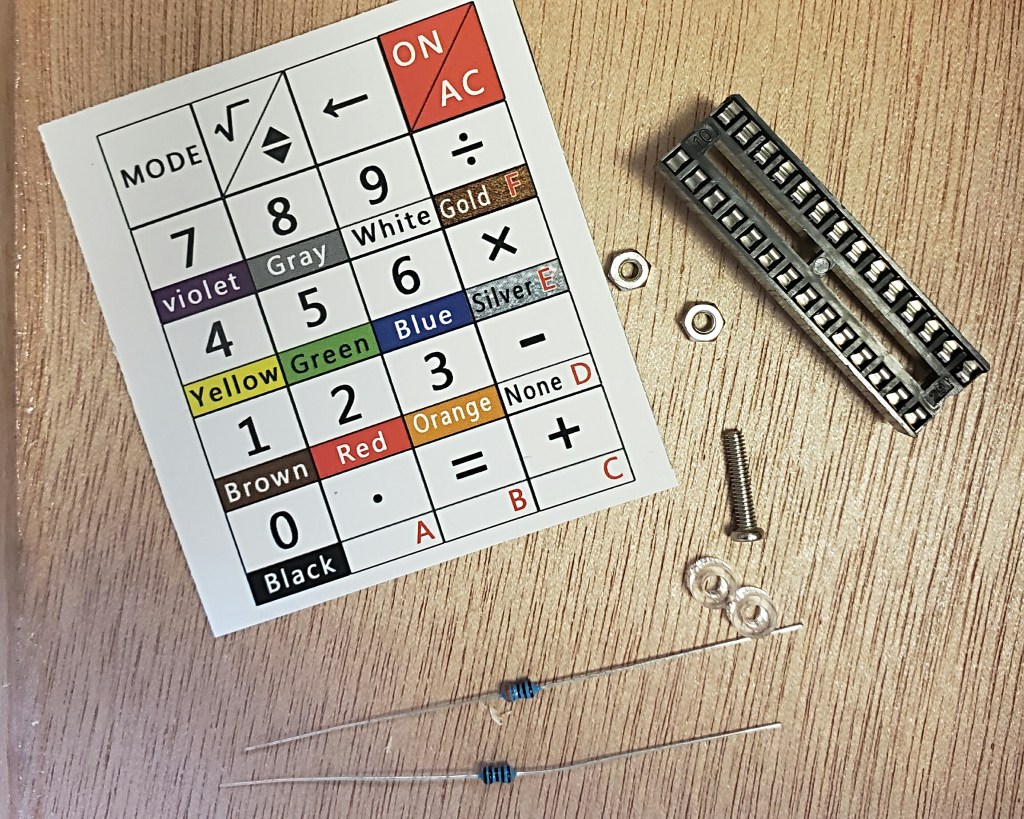
Resistor color code from a Chinese DIY radio kit becomes a veritable “Rosetta Stone” for dealing with other color coded components such as RF transformers :
1 = black, 2 = brown, 3 = red, 4 = orange, 5 = yellow, 6 = green, 7 = blue, 8 = violet, 9 = grey, 0 = white, 5% = gold, 10% = silver.

The Banggood Calculator

Speaking of resistor color codes, what initially attracted me to building this specific calculator kit is that I noticed on the Banggood website that the buttons on this calculator had the corresponding colors of the resistor color code.

The calculator has a mode that will calculate 4 band or 5 band resistor values by entering the color of the rings. (Yes I know that you can easily calculate resistance with the simple table, but this is sort of a cool novelty.)

The calculator has 3 other function modes – basic decimal arithmetic, voltage calculations for LEDs, and decimal-hexadecimal conversion.

I ponied up $13.66 USD and ordered the Geekcreit DIY Calculator Counter Kit Calculator Counter Kit Calculator DIY Kit LCD Multi-purpose Electronic Calculator Electronics Computing with Acrylic Case (yes, that’s the actual product name on the website) along with a few other items to get the total high enough so I could enjoy free shipping. My package arrived on what must have been a not-too-slow-boat-from-China about 2 weeks later.

The Build

One of the great things about this specific kit is that the printed instructions were very good overall and they also included a QR code and the URL for a very well done fully illustrated online step by step assembly guide.

The plated through PCB is well labeled. The soldering portion of the build involves installing five resistors, one disc capacitor, two transistors, two ICs and two diodes.
Soldering in all of the components took less than a half hour’s time. All parts were clearly labeled and the online guide pretty much guarantees error-free building. I chose to not use the IC socket and directly soldered the main chip to the board.
The 20 push buttons have four contacts each and I soldered them to the PCB in four column groups of five, tacking down one terminal for each button, then checking to see that it was flush to the board before soldering the remaining contacts The kit comes with 2 printed sheets of key labels which sandwich between a blue button and clear cap.
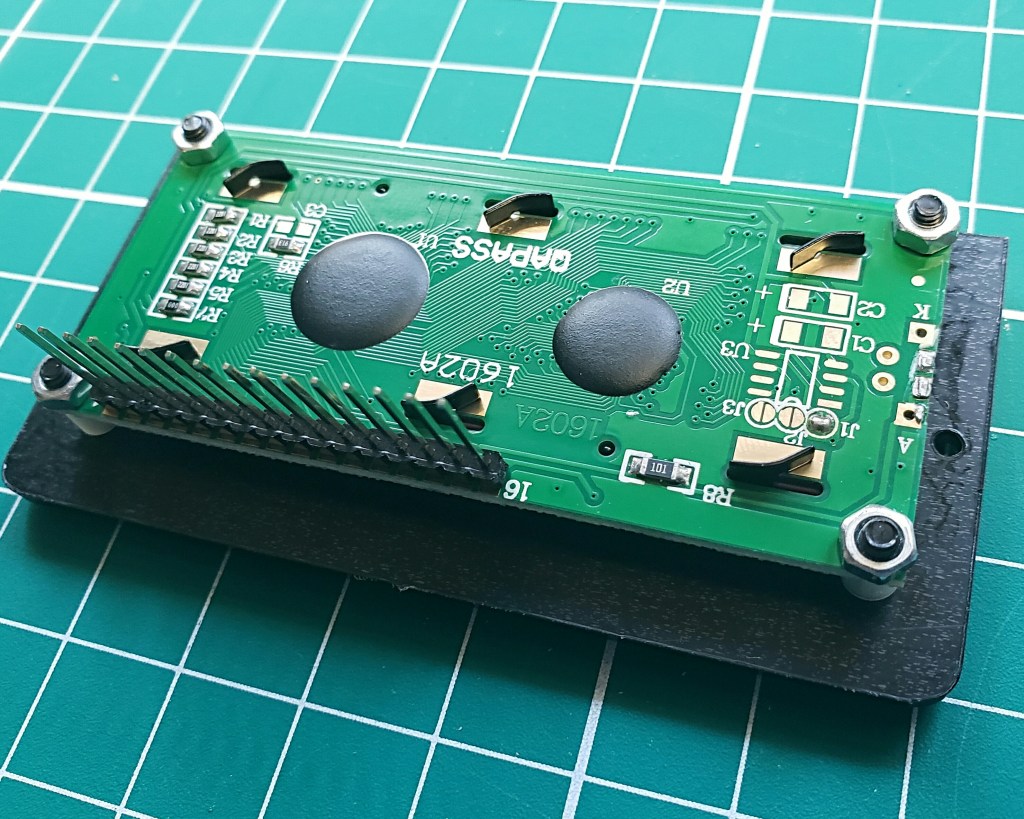
The two row LCD attaches to the main PCB via a 16 pin header strip.

The entire kit took less than 90 minutes to build and I encountered no problems along the way. I did use an ohm meter to confirm the values of the resistors before soldering them in place. The acrylic case went together fairly easily, although aligning the last three screws that hold the LCD in place required a little back pressure with my free hand.

SPARE PARTS – My kit was complete without any missing parts and the kitter (Geekcreit) gets big props for including a spare sheet of the the key labels along with spare parts for some of the pieces that typically fly from my fingers and get lost in the carpeting. I opted to not use the IC socket.

Overall this was an excellent project for a Sunday morning at the workbench and now I have a one of a kind calculator that I can take pride in having built myself.

The only criticism I have about the calculator is that in order to change the two CR2032 batteries, you have to disassemble pretty much the entire acrylic case as there is no battery door. As mentioned above, mounting the LCD screen was a bit fiddly so I hope the batteries exhibit a long enough life.

Overall I would recommend this basic kit for anyone who enjoys building such things.

Have you built any DIY electronic kits from a Chinese online retailer? If so, which ones and what have your experiences been? Please drop me a line at james@ab1dq.com.

©2019 JMSurprenant